Tap and Pay
Contactless payment built for real conditions
Platform
Mobile App
Deliverables
UI & UX
"Contactless payments should work the same way cash does: without conditions."
Why Contactless Needed Rethinking
Contactless payments already existed in Nepal before this project. But they came with conditions. NFC payments were tied to physical cards that required branch visits. Those cards only worked at merchants who had invested in POS terminals. And every transaction assumed a stable internet connection, something that cannot be taken for granted outside major urban areas.
The technology was there. The access was not.
That disconnect is the real problem.
The problem was not a missing feature. It was that contactless had been designed for a different context, and never properly adapted to how banking works for most people in Nepal.
A Different Starting Point
Instead of building contactless as a separate product, this concept integrates tap and pay directly into the mobile banking app.
The app becomes the payment instrument. No physical card to obtain. No dedicated hardware to carry. The feature works through any NFC-enabled POS device or merchant payment software already present in the ecosystem.
For users without NFC-enabled devices, a Customer Presented QR provides a seamless fallback. The merchant's device or software scans the QR and completes the transaction the same way.
And when there is no internet connection on the customer side, the feature still works. The transaction goes through as long as the merchant terminal is online.
Key Design Decisions
NFC + CPQR are treated as equal payment paths
→ NFC for tap-based speed
→ CPQR for device fallbackPayments can initiate without mandatory login
→ reduces friction at the moment of transactionOffline behavior is supported on the customer side
→ QR generation works locally
→ NFC works as long as merchant terminal is onlineNFC status is persistent across app states
→ users always know if payment is possible before attempting
Each decision is focused on one outcome: reduce uncertainty at the moment of payment.
Enabling the Feature
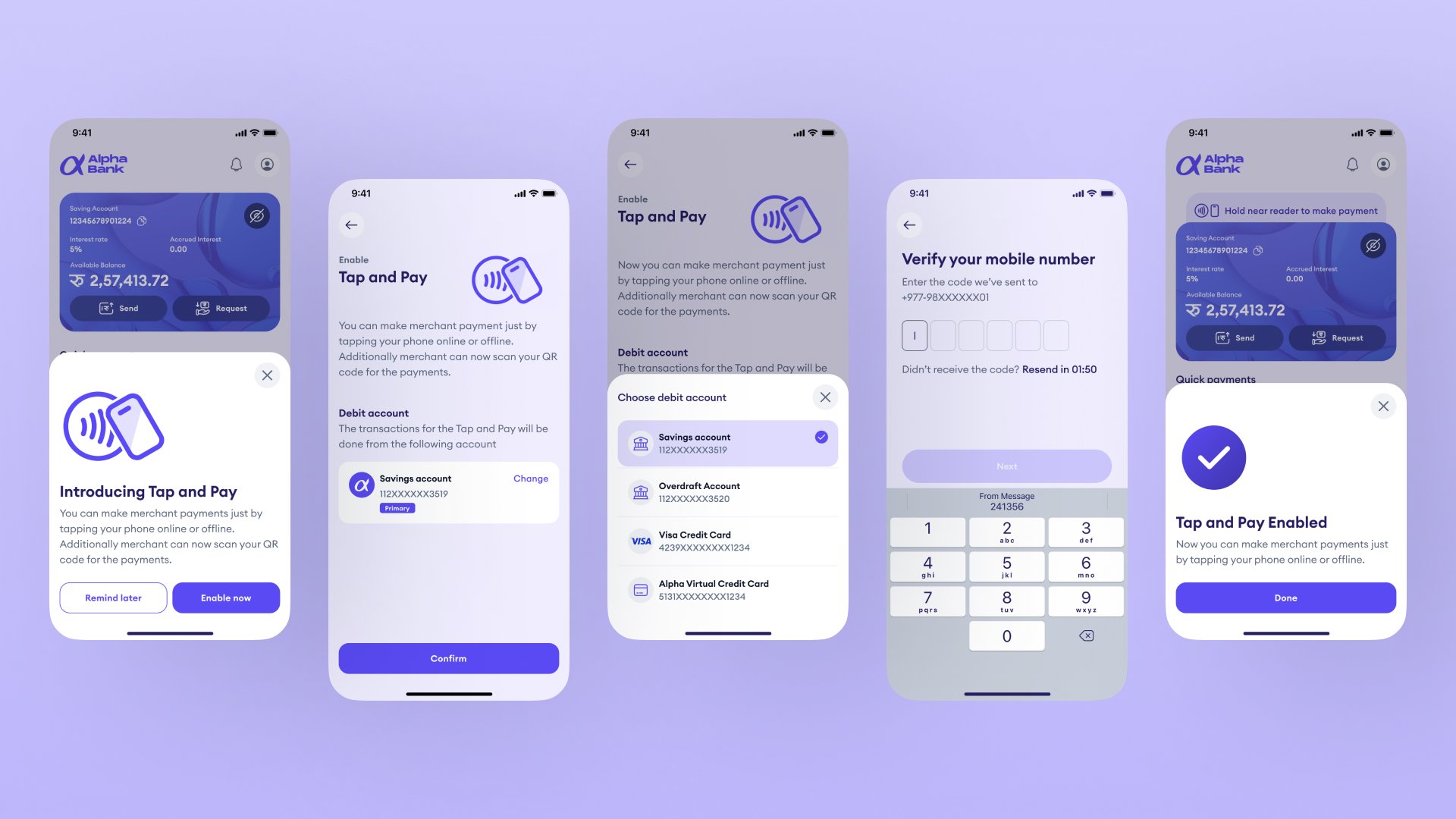
The first time users encounter tap and pay, it appears as a bottom sheet on the home screen introducing the feature with two clear options: enable now or remind later. This moment is designed to feel like a natural discovery rather than an interruption.
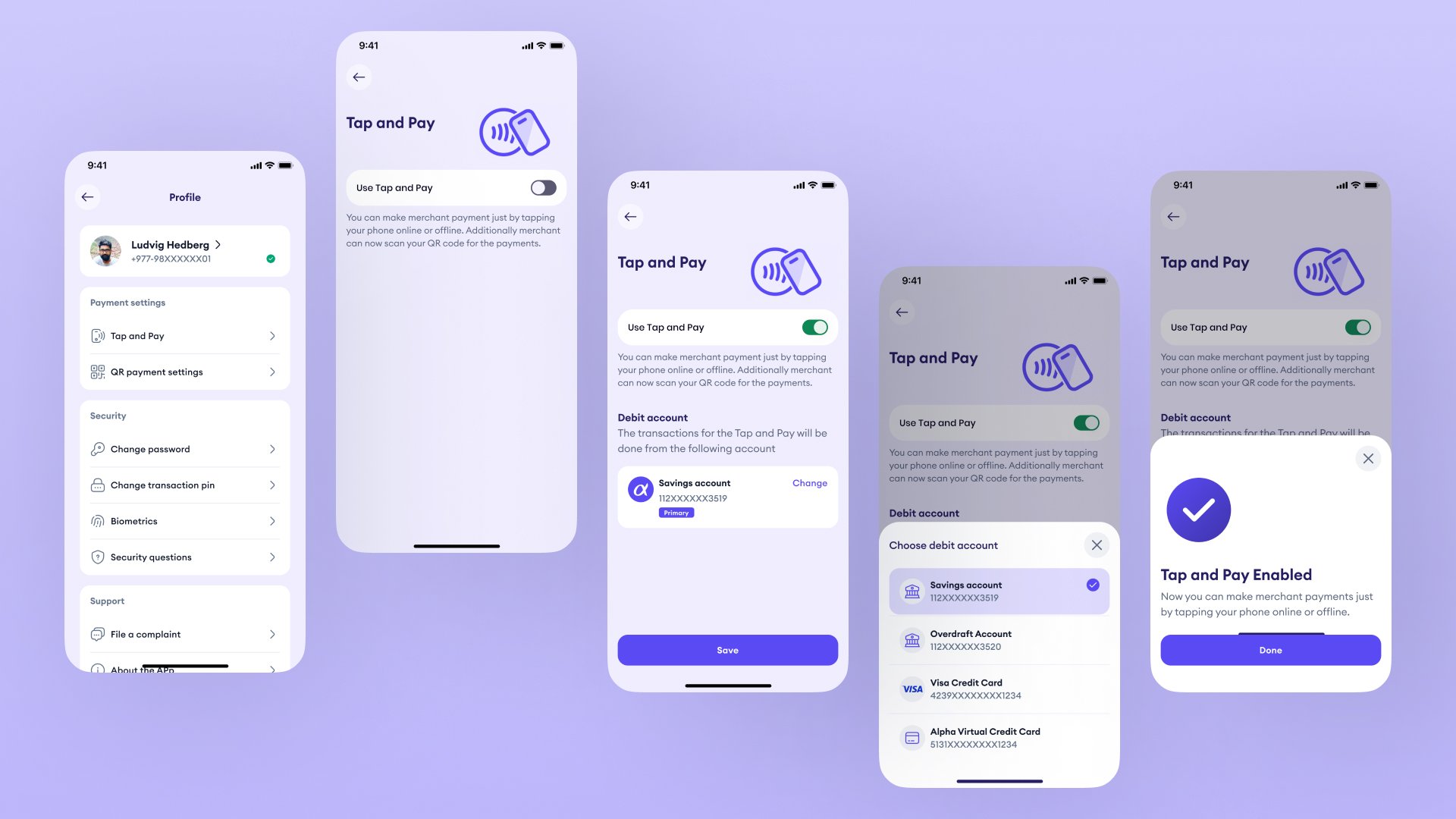
Choosing to enable starts a short setup flow. Users see a description of what the feature does, the account linked for tap and pay transactions with an option to change it, and a Confirm button. If they want to use a different account, a bottom sheet presents all available options including savings, overdraft, and card accounts.
Once confirmed, users verify their identity with a one-time OTP sent to their registered number. After verification, a confirmation bottom sheet appears on the home screen with "Tap and Pay Enabled" and the feature becomes immediately active.
Always Ready
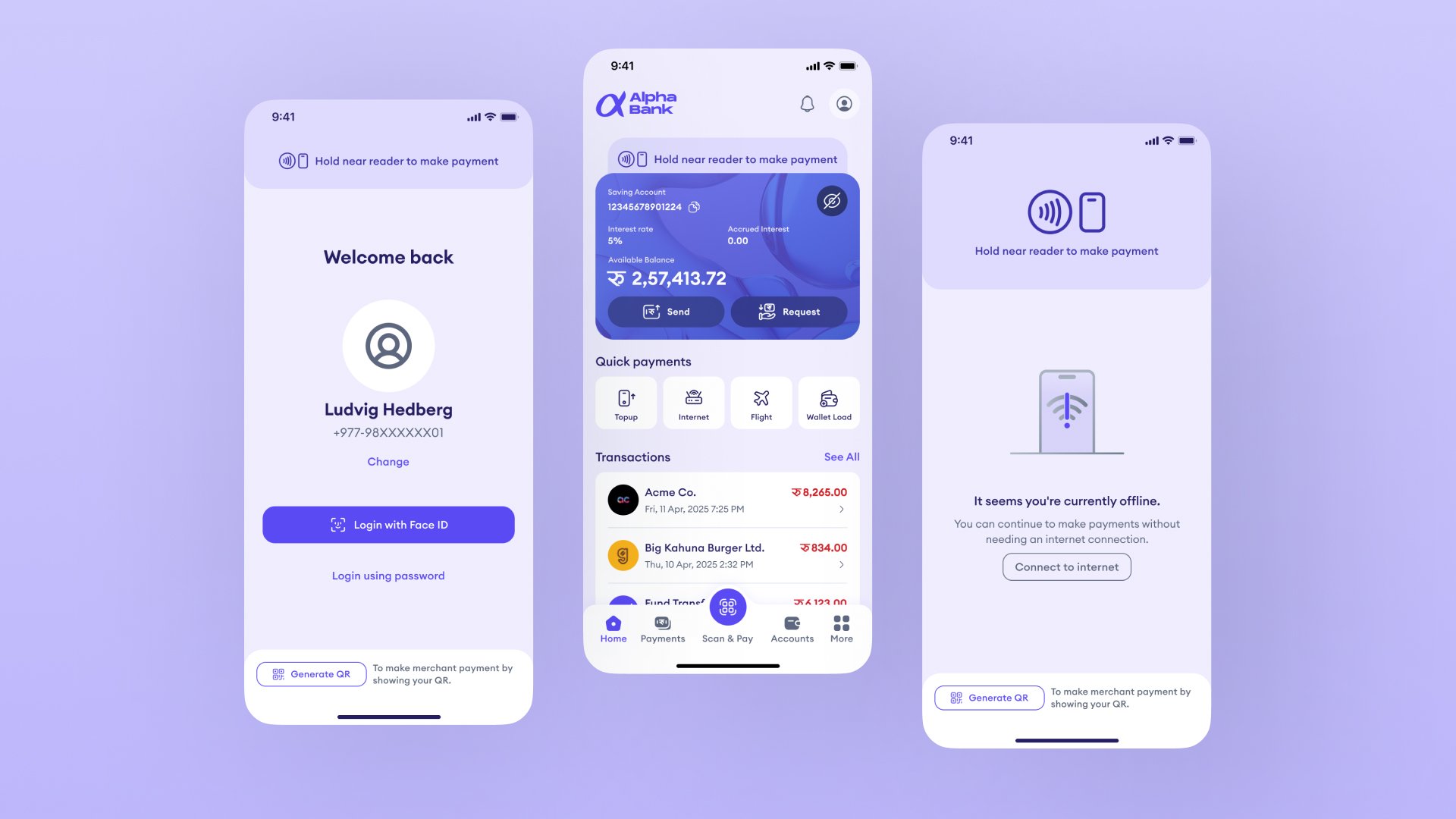
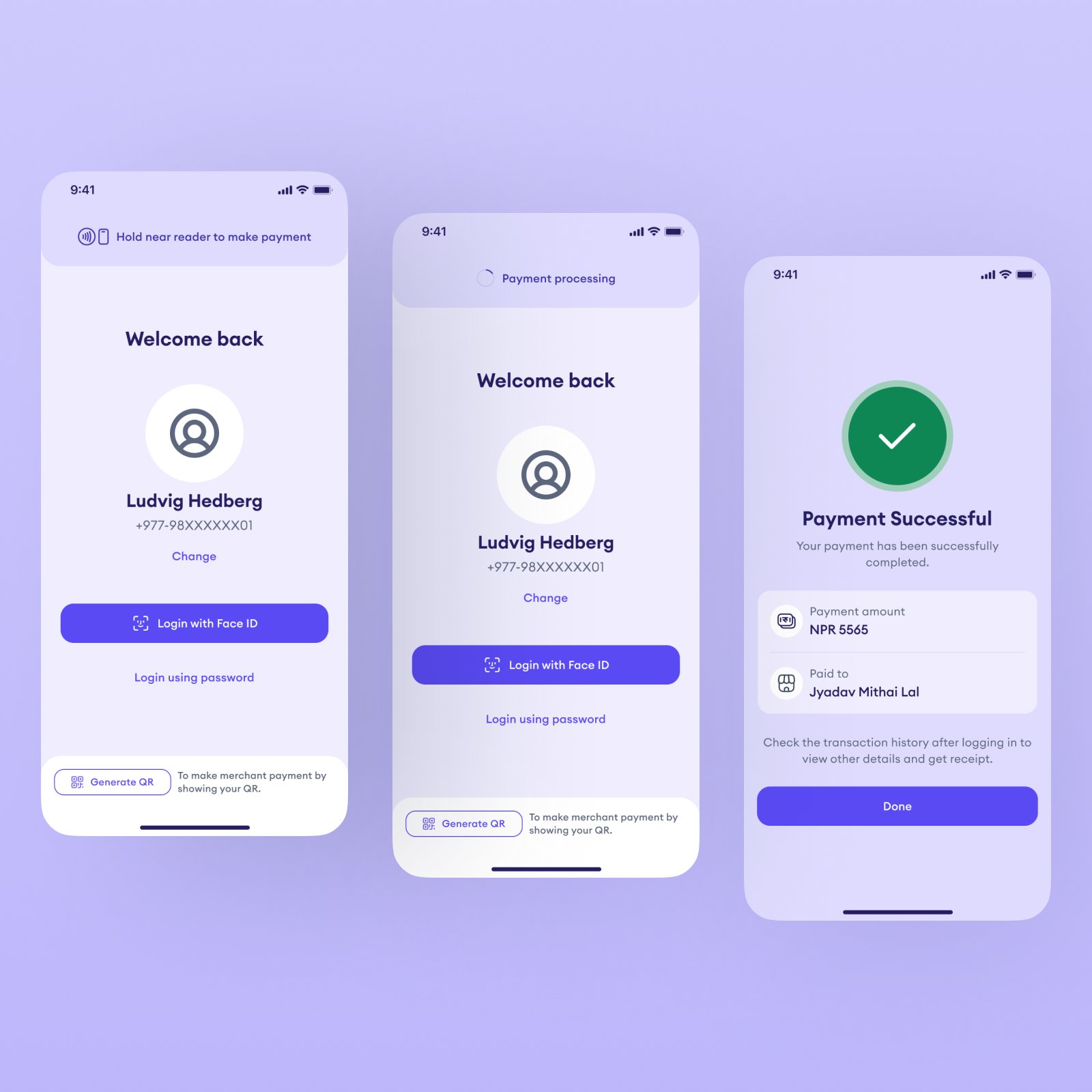
Once enabled, tap and pay is available in every state of the app, whether the user is fully logged in, on the login screen, or offline.
A persistent bar shows the current NFC status across all these states so users always know whether the feature is active before they need it. When NFC is ready, the bar reads "Hold near reader to make payment." When NFC has been turned off in device settings, a clear prompt with a direct action link lets users re-enable it immediately. When the device is offline, the bar remains visible and the payment can still proceed.
This consistency was a deliberate decision. The feature should never feel unavailable or uncertain regardless of what state the user is in. Discovering that NFC is off or that the app needs to be fully opened first creates friction at exactly the wrong moment. The status bar removes that uncertainty entirely by being present at every entry point.
Making a Payment
At the point of payment, the experience requires as little from the user as possible.
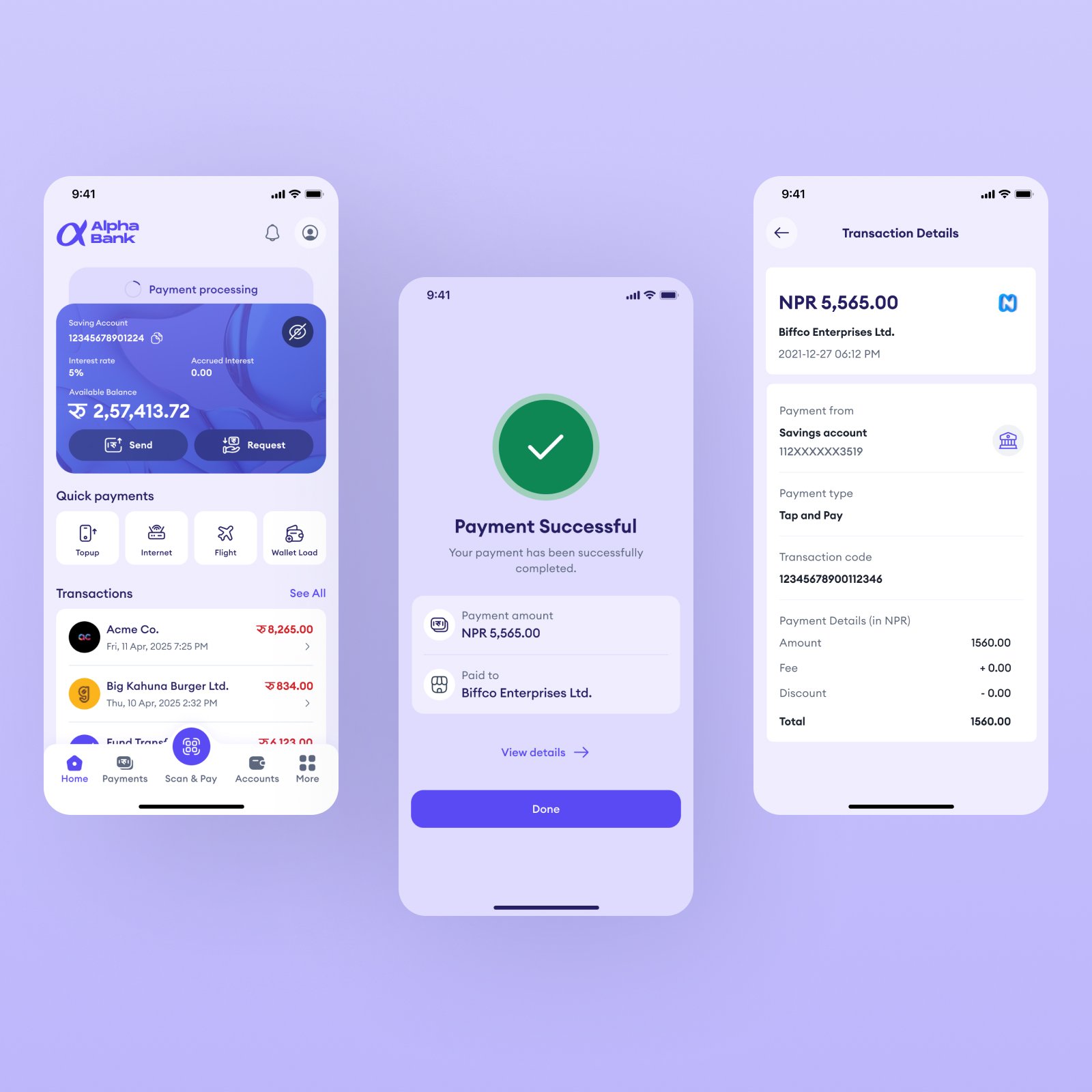
The user needs to open the app but does not need to be logged in to make a payment. For NFC payments, the user simply holds their phone near the merchant's NFC-enabled device and the transaction initiates automatically. For CPQR, the user generates a QR code that the merchant scans to complete the transaction.
When fully logged in, the payment flows directly from the home screen. When not logged in, the payment initiates from the login screen and completes without requiring the user to authenticate first. A confirmation screen shows the amount paid and the merchant name in both cases. Full transaction details are available once the user logs back in.
Works Offline Too
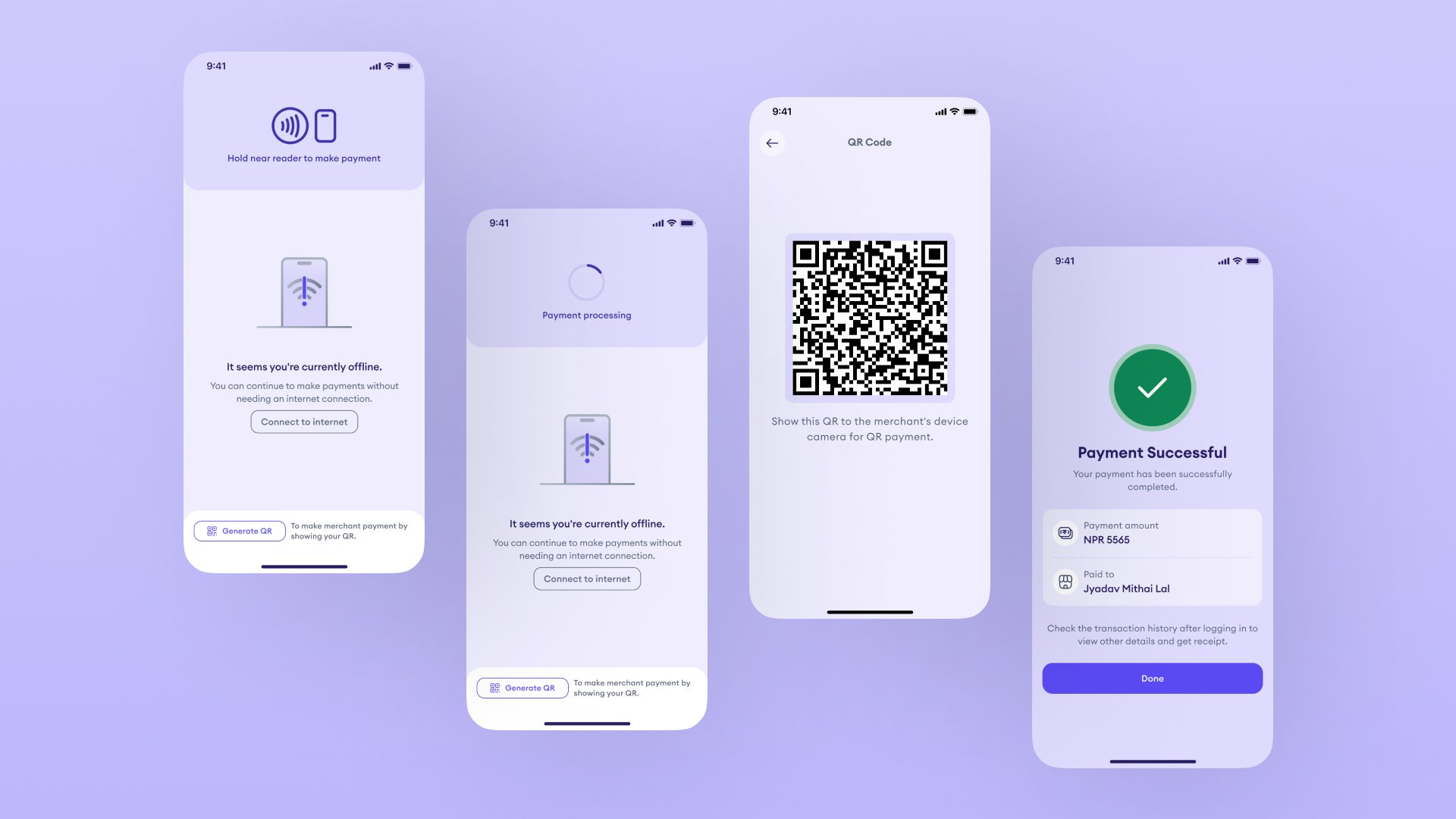
When the customer's device has no internet connection, the app detects this and shows a clear, calm prompt. It does not block the payment. It simply informs the user that they are offline and that payments can still continue without an internet connection.
For CPQR in offline scenarios, the QR code is generated locally on the device. The merchant scans it from their side to complete the transaction.
This was one of the most important design decisions in the project. Connectivity cannot be assumed. The experience had to be designed to handle that gracefully rather than failing silently.
Managing Tap and Pay
After initial setup, users can manage tap and pay from their profile settings at any time.
The settings page gives users two controls. A toggle to enable or disable the feature entirely, and a debit account section to change which account tap and pay transactions are deducted from. When the toggle is off, only the toggle and feature description are shown. When the toggle is on, the full account section appears with a Change option and a Save button that activates when a new account is selected.
This gives users ongoing confidence that they are always in control of how the feature behaves.
On the Merchant Side
Merchants do not need to invest in new dedicated hardware to accept these payments.
Any NFC-enabled POS device or merchant payment software that supports standard NFC or QR scanning can accept tap and pay transactions. The feature is designed to work within the merchant infrastructure that already exists across Nepal's payment ecosystem rather than creating a dependency on any single hardware provider or platform.
What This Solves
This concept makes contactless payment a native feature of the mobile banking app rather than a separate product.
It removes the physical card dependency. It removes the connectivity barrier by working offline on the customer side. It removes the device barrier through the CPQR fallback. And it works with the merchant infrastructure already in place.
The result is a contactless payment experience that works for more people, in more places, more of the time.
Final Statement
Most payment features are designed for ideal conditions.
This one was designed for the conditions that actually exist: inconsistent connectivity, diverse device capabilities, and a payment infrastructure that is still growing.
The goal was not just to add a new way to pay. It was to make contactless feel genuinely reliable for the first time.