Virtual Credit Card
Reimagining credit in a QR-first economy

Platform
Mobile App
Deliverables
UI & UX
"Credit hasn't failed in Nepal because people don't want it. It's failed because it was never designed for how people here actually pay."
The Gap
Credit in Nepal is not absent. It exists in banks, in lending products, in physical cards that some people carry. But the experience of actually using it involves steps that most people quietly abandon: visiting a branch, submitting documents, waiting for approval, receiving a physical card, finding a merchant with a POS terminal that accepts it.
Meanwhile, QR payments have become something else entirely. People scan and pay at roadside stalls, in taxis, at small shops in neighborhoods where a POS terminal would never make economic sense. The behavior is already there, already trusted, already fast.
That gap — between how credit works and how people already pay — is the actual problem this project was trying to close. Not by educating users about credit, but by redesigning credit so it fits inside a behavior they already own.
The Shift
The traditional credit model asks users to operate in a separate system. A separate card. A separate POS infrastructure. A separate mental model for what credit is and how it moves. In a context where QR payments have already won, asking people to carry and manage a physical card to access credit is asking them to go backwards.
The concept starts from the opposite direction. Instead of adapting users to credit, it adapts credit to users. A virtual card lives inside the banking app they already open every day. It activates, gets used, and gets repaid entirely within a system they already trust — and it pays through the same QR scan they already use for everything else.
The design consequence of this is significant. It means credit stops being a product someone has to go get, and starts being a capability that is already there when they need it.

Visible From the Start
One of the reasons credit adoption is low is that the starting point is usually invisible. There is no moment inside a banking app where a user naturally discovers that they might be eligible for credit, or what their limit would be, or how to get started. Credit lives behind a separate application process that users have to seek out deliberately.
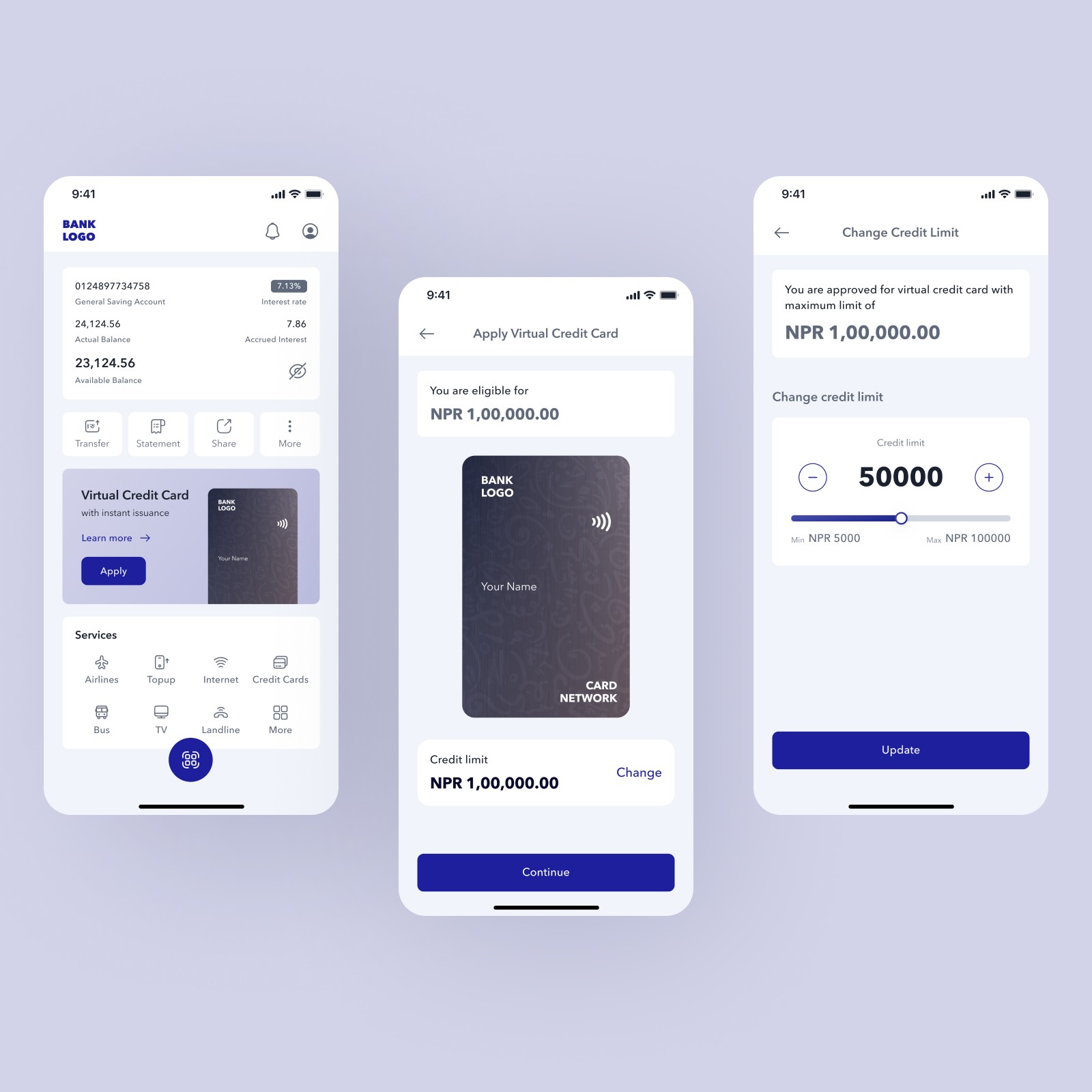
The experience here begins differently. A widget on the banking dashboard shows credit availability directly alongside a user's account balance — their eligible limit, shown upfront, with a single entry point to apply. The decision to show eligibility before a user has done anything is deliberate: it removes the step where most people drop off, which is not the application itself but the uncertainty about whether it is worth starting.
Showing the credit limit early also changes the psychological framing. It is no longer a bank deciding what to offer after reviewing a file. It is information already present in the app, waiting to be activated.
Onboarding Without Friction
The onboarding flow is three steps: repayment settings, linked account selection, and card design. That order is intentional. Repayment comes first because it is the thing users are most anxious about with credit — how and when will money leave my account — and resolving that anxiety early makes everything that follows feel less risky. Choosing a card design comes last because it is low-stakes and gives the user a moment of ownership before they confirm.
Repayment is not a feature users configure after they start spending. It is the first decision they make. That sequence matters because it reframes the whole product: this is not a card you get and then figure out later. It is a card you understand before you activate it.
The card design selection is also not cosmetic decoration. Letting users choose how the card looks before they have spent a single rupee makes the product feel personal immediately. The card belongs to them before they have done anything with it.

One Clear View
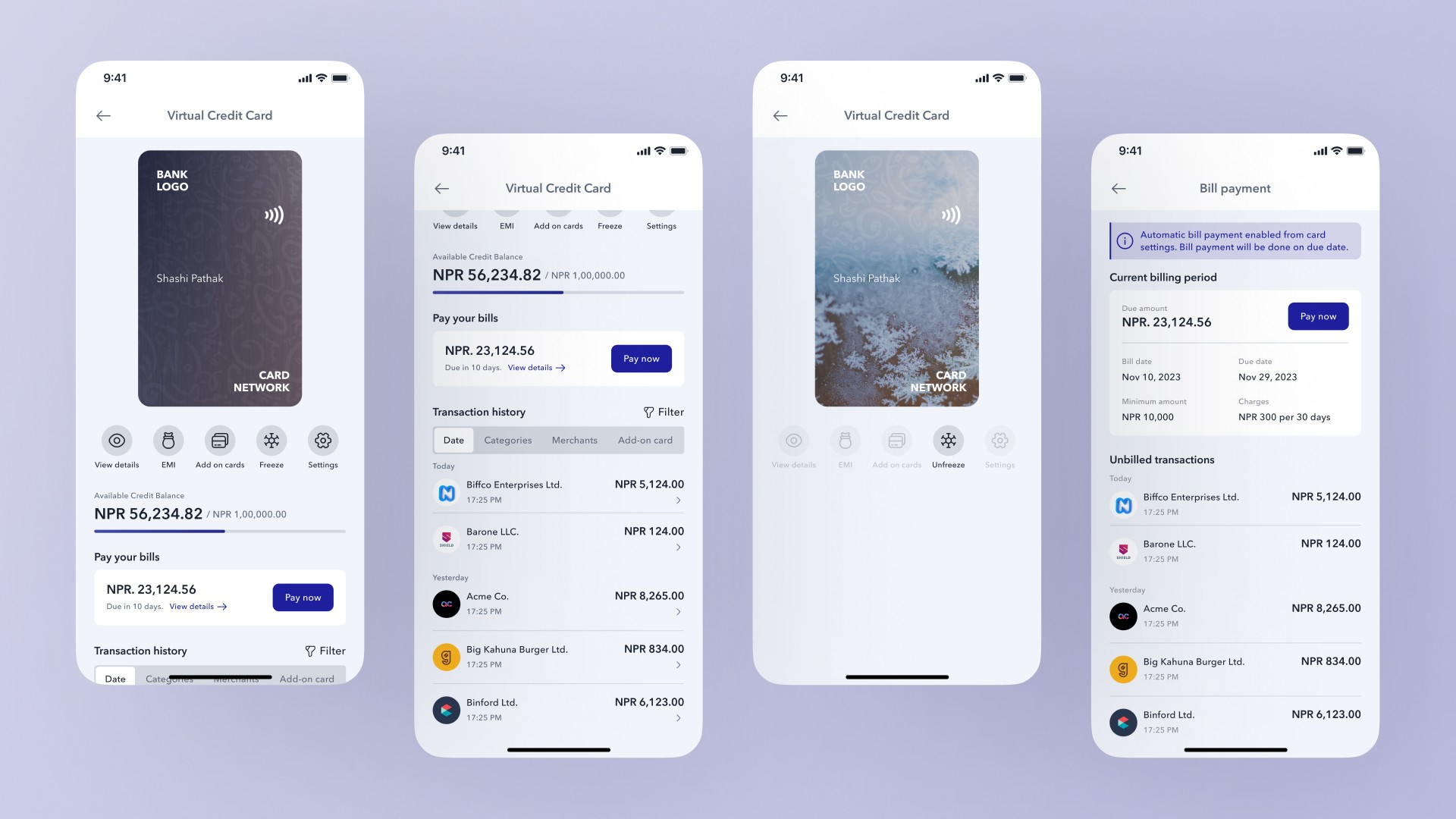
The single biggest reason people distrust credit is that they cannot see what is happening to it. Available balance, used balance, upcoming repayment, transaction history — in most credit products, this information is scattered across screens, buried in statements, or written in language that requires some effort to decode. Users who cannot immediately answer the question "how much do I owe and when" will either stop using the card or use it anxiously.
The home screen of the virtual card is designed around that question. Available credit and used credit are shown together, immediately, as the primary content. The repayment amount and due date sit directly below. Transactions are visible one scroll away. Nothing about the user's credit situation requires navigation to find.
This is not a simplification for the sake of minimalism. It is a deliberate response to the specific way credit anxiety develops — not in the moment of spending, but in the gap between spending and understanding what that spending means for what comes next.
Paying with Credit, Naturally
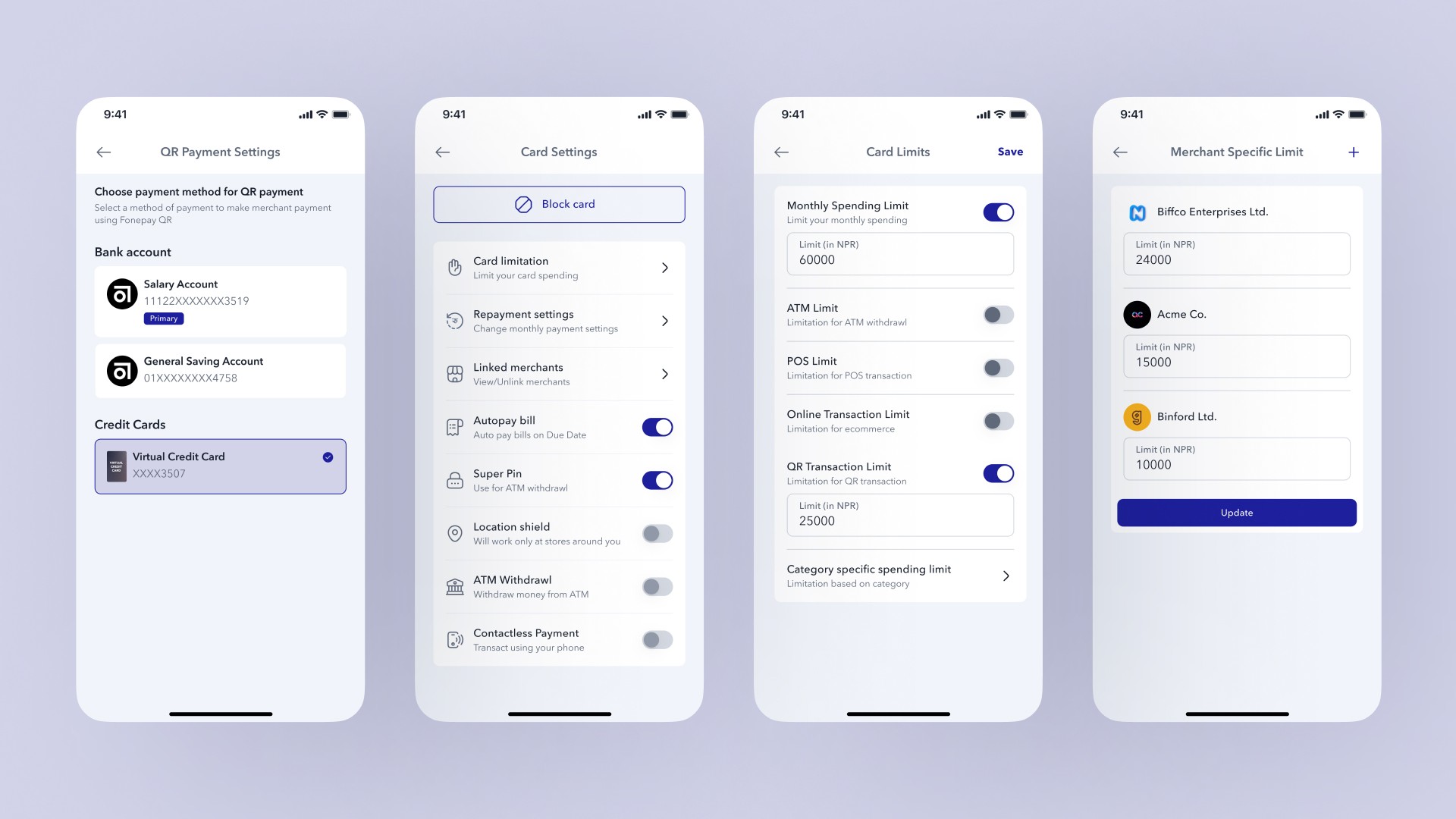
The point of payment is where the concept either works or it does not. If using credit requires a different gesture, a different screen, or any behavior that does not already exist in how people pay, the friction is enough to make most users default back to their bank account.
The payment flow does not introduce anything new. A user scans a QR code the same way they always do. On the payment confirmation screen, the virtual card appears as a payment source alongside their regular accounts. Selecting it and confirming completes the transaction. There is no separate card terminal, no different authentication step, no reminder that they are doing something unusual.
That invisibility is the goal. Credit that feels like a natural part of paying is credit that actually gets used. The moment it requires conscious effort or a separate mental mode, most users will not bother.
Transparent by Default
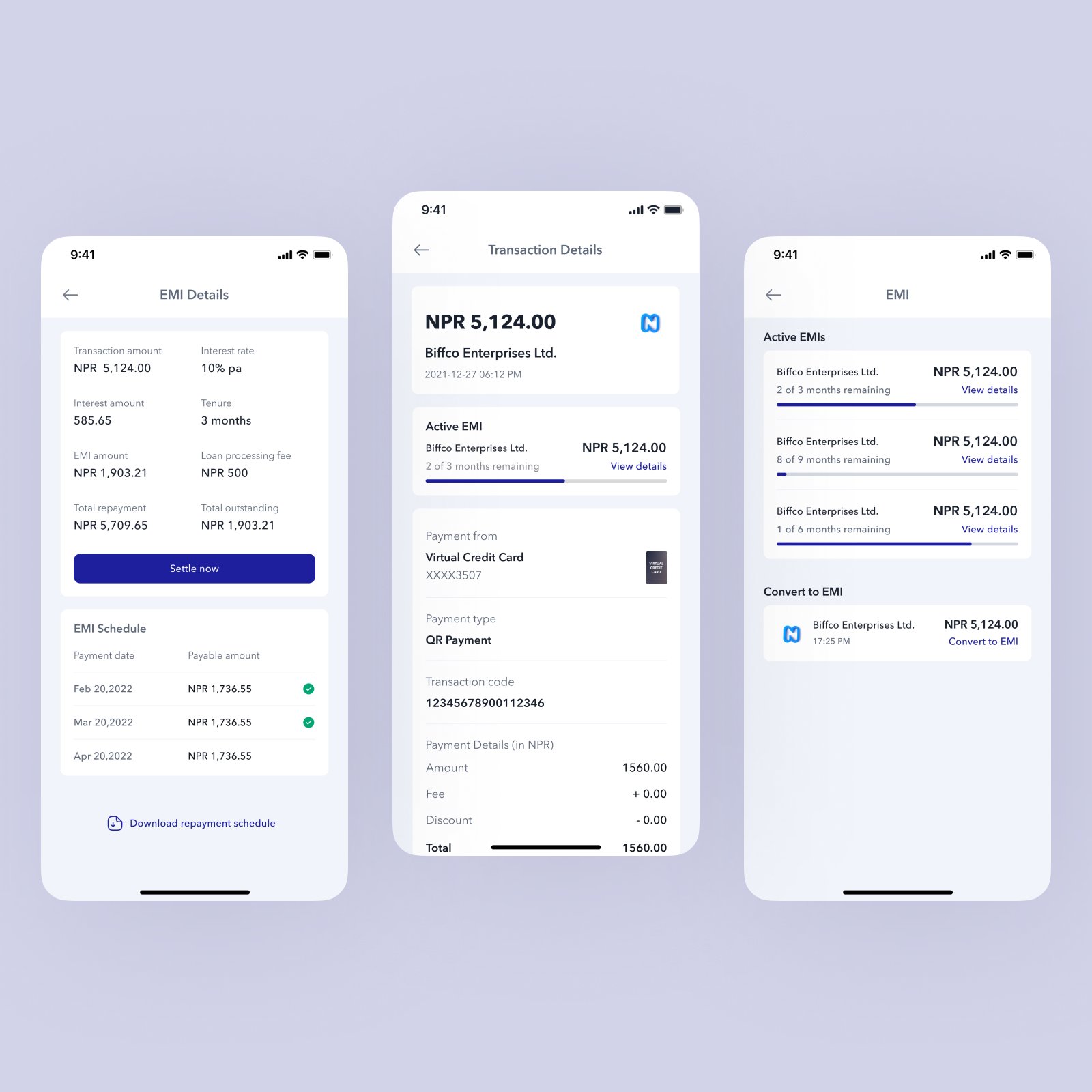
After a transaction is made, the record of it does more than confirm what happened. It shows the merchant, the payment channel, the exact amount, the card used, and how the transaction was processed. That level of detail is not there to satisfy curious users. It is there because ambiguity in a credit transaction — not knowing exactly what was charged, or by which mechanism — is one of the things that makes people wary of credit in the first place.
Transparency here is not a settings toggle or an optional detail screen. It is the default. Every transaction is fully visible and fully explained before a user has to ask for it.
Credit Within a Household
Credit decisions are rarely made by a single person in isolation. In many households, a primary earner manages financial products while other family members also have spending needs. The typical solution is to share a card, which removes any visibility or control over how it is being used.
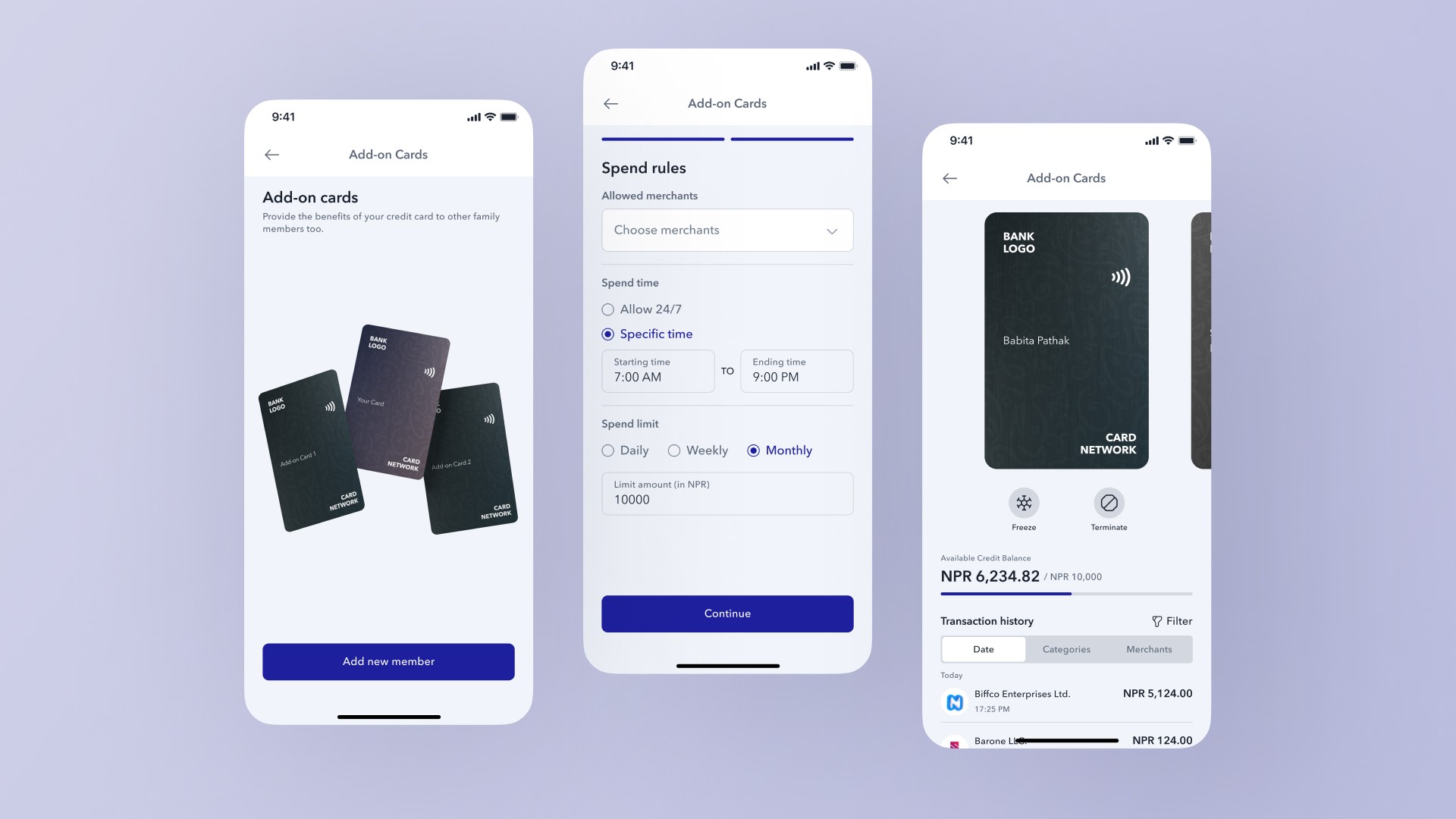
Add-on cards let the primary cardholder issue additional cards to family members with specific rules attached: which merchants they can use the card at, which hours of the day it is active, what the spending ceiling is. The primary holder sees all transactions across all cards in one place.
A user who cannot define how their credit is being used by others will either refuse to share it or share it anxiously. Giving them the rules upfront, before any spending happens, makes the whole arrangement feel manageable rather than risky.
Built-in Control
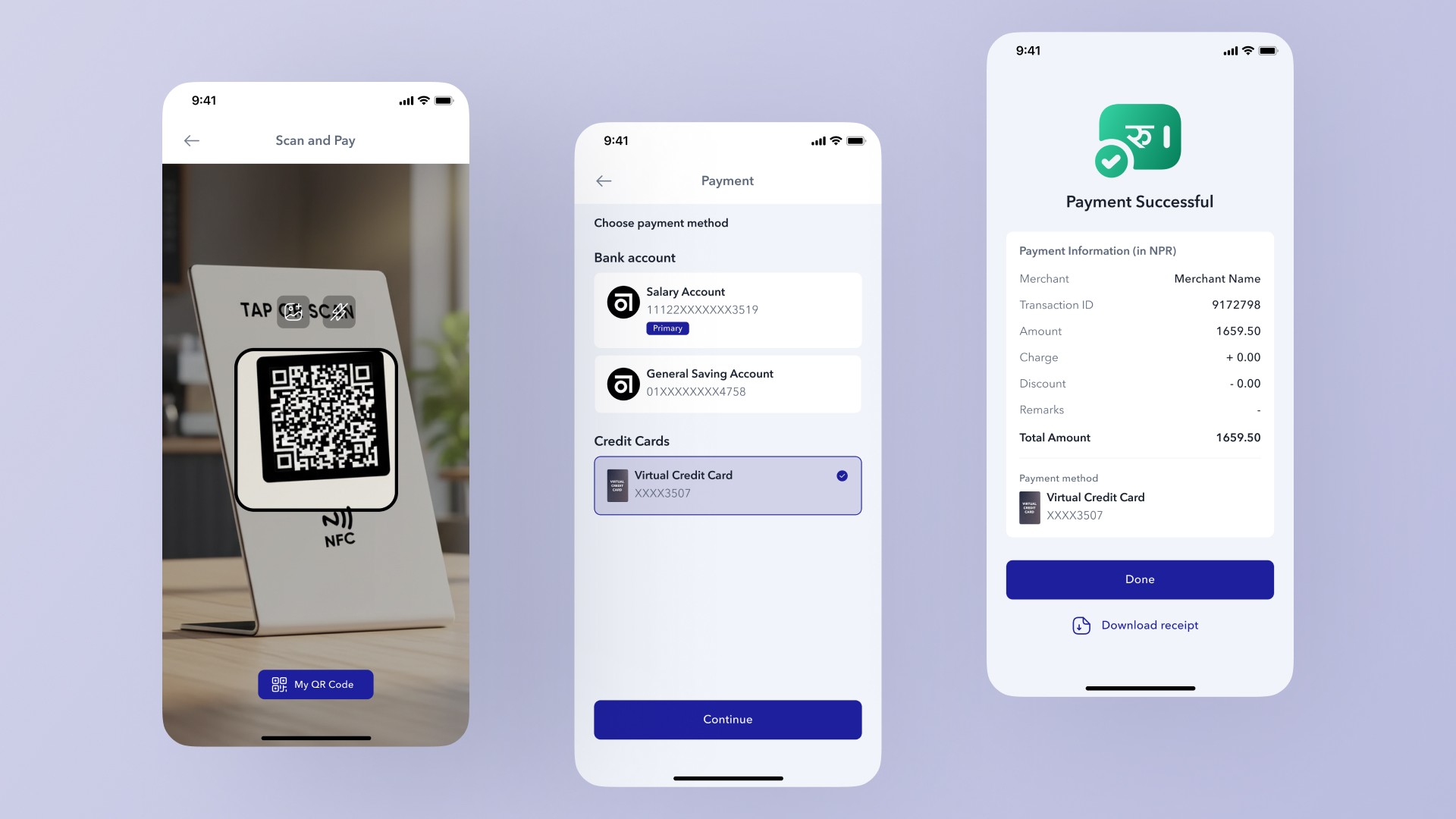
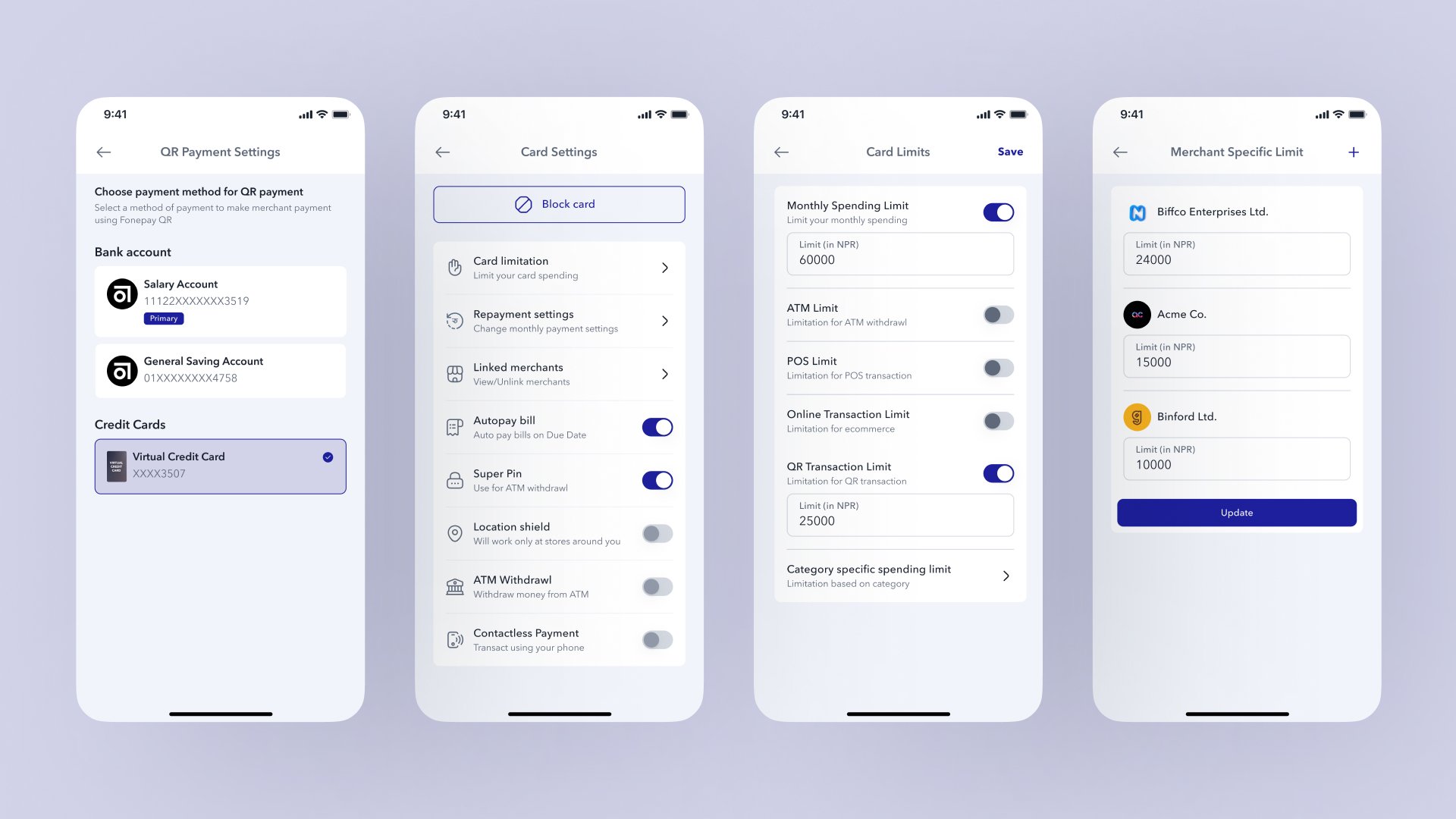
In a market where credit is still new to many users, the first question is not "how do I spend more" but "what happens if something goes wrong." Designing for that anxiety means making controls easy to find and easy to use, not locking them behind an account settings screen that most users will never open.
Spending limits by category, channel restrictions, QR-specific rules, merchant-level controls — these are all accessible from the card settings page, reachable in two taps from the home screen. The freeze card option sits at the same level of prominence as the payment button. Control that is hard to reach provides almost no psychological benefit. The design treats reachability as part of the feature itself.
Repayment as Part of the Experience
Repayment is usually where credit products lose their users. Not because the repayment itself is difficult, but because it arrives as a surprise — a bill statement at the end of the month that the user has not been tracking and cannot immediately reconcile against what they remember spending.
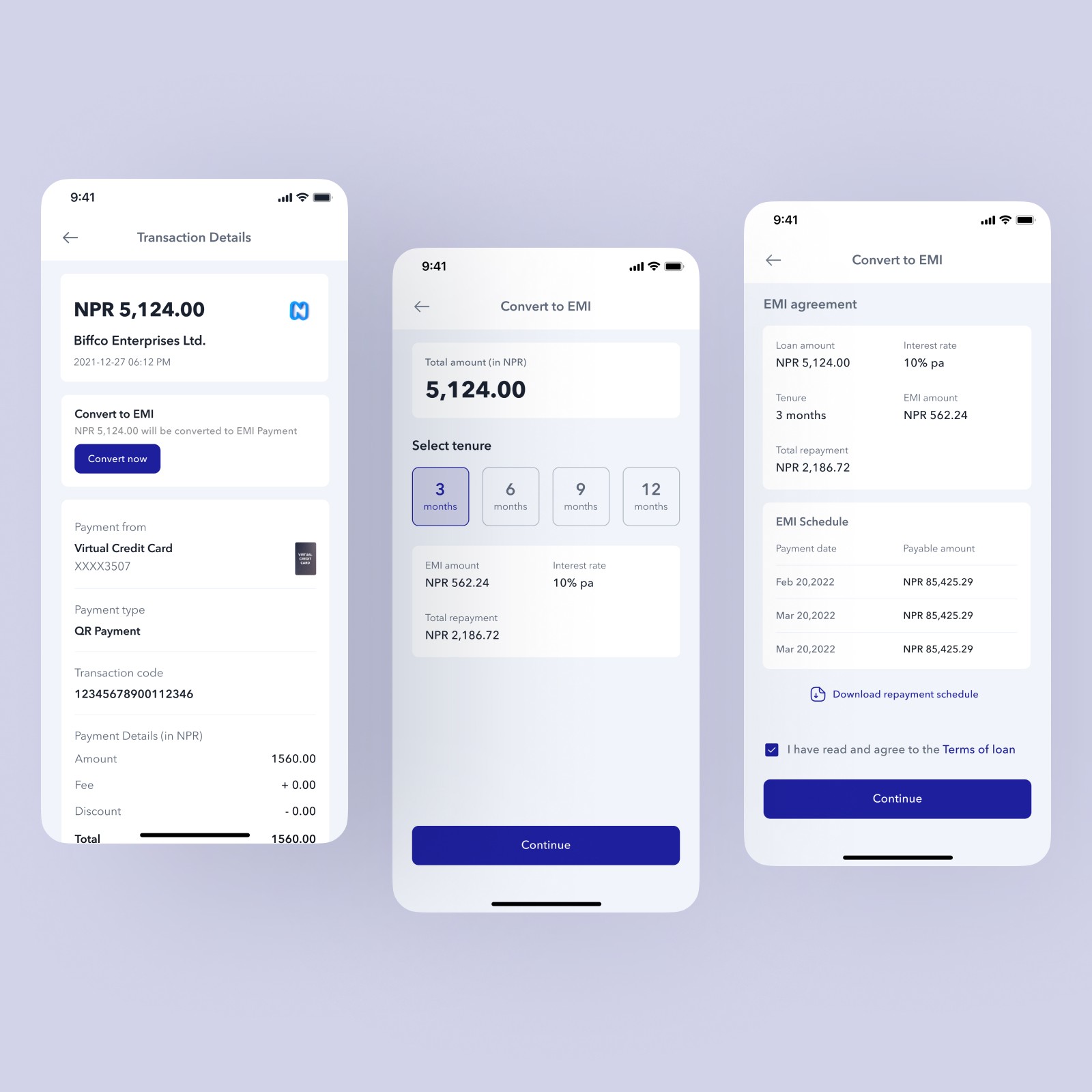
The repayment experience here is built around the opposite assumption: that a user who has been watching their balance throughout the month should never be surprised by what they owe at the end of it. The due amount is always visible on the home screen. By the time a repayment is due, the user has already seen it coming for weeks.
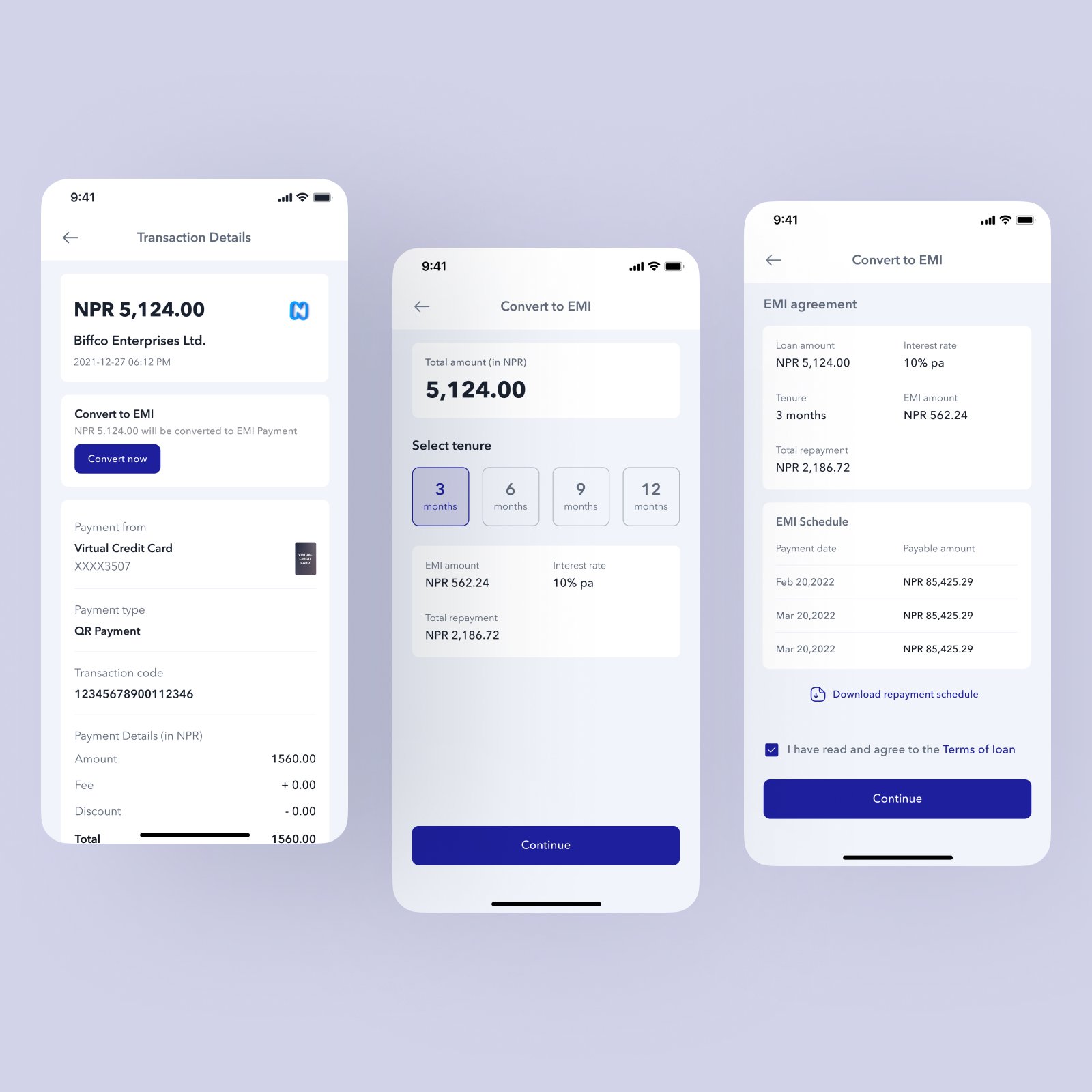
For larger purchases, converting to EMI is available directly from the transaction screen. The user chooses a tenure, sees the exact monthly amount and total interest before confirming, and the repayment schedule appears immediately. The point is to make the full cost legible before the user commits, so the decision is made with open eyes.
What This Changes
This concept does not change what credit is. It changes where it lives and how it behaves. Credit that lives inside an app people already trust, pays through a gesture they already make, and repays through an account they already manage is not a different financial product — it is the same product in a context that finally makes sense for it.
The physical card dependency disappears. The POS infrastructure dependency disappears. The paperwork-heavy application process disappears. What is left is a credit product that can reach people who would never have walked into a branch to apply for one — not because they lacked interest, but because the process was never designed with them in mind.
Final Statement
Nepal did not adopt cards first. It adopted QR. That is not a gap in the market — it is a signal about how financial behavior actually develops when infrastructure is built from scratch rather than inherited.
Most of the design decisions in this project are not about features. They are about the sequence in which information appears, the proximity of controls to the moments when they matter, and the deliberate removal of anything that makes credit feel like a separate system a user has to manage alongside their regular banking.
The goal was not to make a better credit card interface. It was to design something that makes credit feel like it was always supposed to work this way — obvious in hindsight, invisible in use.